
 MCV/DEVELOP News, events, research and jobs from the games industry
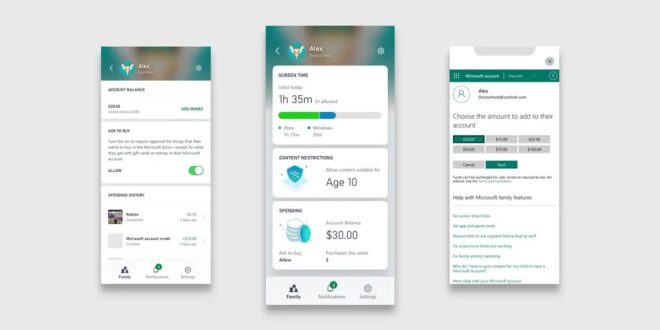
Xbox has released several new updates to the Xbox Family Settings App, including the ability to manage and track a child’s spending on the platform.
Users can now set a spending limit by manually adding funds to the Microsoft account, and remove the ability to make purchases with a debit or credit card.
Users can also approve purchases via the ‘Ask to Buy’ feature, in which a child can request to make a purchase that they don’t have sufficient funds for. The parent or guardian can then either add money to the account for the purchase, or deny approval.
It is also now possible to view a child’s account balance and spending history, joining the app’s existing features to track screen time, multiplayer access and the ability to limit age-inappropriate game content.
“One of the top pieces of feedback we’ve received from parents about the Xbox Family Settings app is to include options to track and manage kids’ spending,” said Xbox Family, Trust and Safety boss Kim Kunes.
“Feedback has ranged from “I’d like to add money to my child’s account as a reward for good grades on their report card. Can I do this from the app?” to “I want to give my kid an allowance to spend money on games through the app,” and “How do I manage how much money my son can spend while he’s gaming? I don’t want any surprises!””


![golden joysticks clair obscur 660x330 1 [Industry news] Winners Announced at the 43rd Golden Joystick Awards](https://mcvuk.com/wp-content/uploads/golden-joysticks-clair-obscur-660x330-1-310x165.png)
![xds img header 1 [Industry news] XDS marks move to the Vancouver Convention Centre with 50% off tickets for first 100 developers](https://mcvuk.com/wp-content/uploads/xds-img-header-1-310x165.jpg)
![5be85a38 c451 05f0 76b0 5e93081baf59 [Industry news] GameSkills Confirms First Expert Line-Up for 2026 European Studio Training Programme](https://mcvuk.com/wp-content/uploads/5be85a38-c451-05f0-76b0-5e93081baf59-310x165.png)